
How to integrate the Salicru SPS 500 ONE UPS with Home Assistant using Docker.
How to integrate the Salicru SPS 500 ONE UPS with Home Assistant using Docker.

Well, since practically all my services are self-hosted on my server, I decided to buy a UPS (Uninterruptible Power Supply) so that if the power goes out for any reason, the server won’t shut down abruptly and potentially damage a component, especially an HDD.
Since I only wanted it for the server and not much else, I chose the Salicru SPS 500 ONE, which is more than enough for the server and anything else I might connect to it in the future.
Once I had it connected, I started looking into how to integrate it with Home Assistant. I had previously seen people who had integrated UPS systems into their HASS, so I began to investigate.
First, the obvious part: for the UPS to communicate with our Home Assistant, we need to connect the UPS via USB to the device where we have Home Assistant running.
For our Home Assistant to communicate with the UPS, we need NUT, a tool that acts as a bridge between the UPS and Home Assistant.
In our case, we are going to run NUT in Docker along with Home Assistant in the same docker-compose.yml.
Detecting the New USB Device of the UPSh2
We will execute the following command:
(We need to have usbutils installed)
# lsusb
Dockerh1
Once we have these two figures, we will substitute them into our compose file (the complete compose is later in the post).
devices: - /dev/bus/usb/001/003Once we have this information, it’s time to deploy our two services in Docker:
With Traefik
version: '3.9'
services:
  homeassistant:    image: homeassistant/home-assistant:latest    restart: unless-stopped    volumes:      - /data/homeassistant:/config    environment:      - TZ=Europe/Madrid    network_mode: host    labels:      - traefik.enable=true      - traefik.http.routers.homeassistant.entryPoints=web-secure      - traefik.http.routers.homeassistant.rule=Host(`homeassistant.crstian.me`)      - traefik.http.services.homeassistant.loadbalancer.server.port=8123
  nut-upsd:    container_name: nut-upsd    image: upshift/nut-upsd    restart: unless-stopped    environment:      - UPS_DRIVER=blazer_usb    ports:      - '3493:3493'    devices:      - /dev/bus/usb/001/003
Without Traefik
version: '3.9'
services:
  homeassistant:    image: homeassistant/home-assistant:latest    restart: unless-stopped    volumes:      - /data/homeassistant:/config    environment:      - TZ=Europe/Madrid    ports:      - '8123:8123'    network_mode: host
nut-upsd: container_name: nut-upsd image: upshift/nut-upsd restart: unless-stopped environment: - UPS_DRIVER=blazer_usb ports: - '3493:3493' devices: - /dev/bus/usb/001/003Importanth2
In my case, the UPS driver is “blazer_usb” but not all UPS devices use the same driver. To find out which driver you would need if you are not using an SPS 500, you can check here by entering your model which will tell you the required driver.
Home Assistanth1
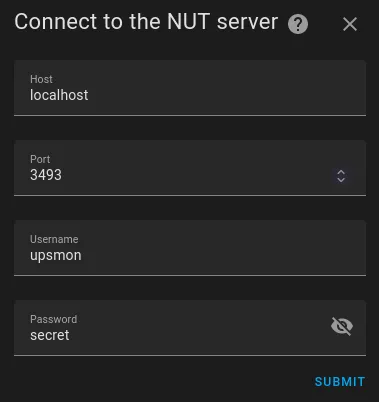
Now let’s go to our Home Assistant to add our NUT:
We add a new NUT integration and set up the connection with ours.
Here are the default username and password; if you want to change them, you can add it as an environment variable in the compose. More info here.
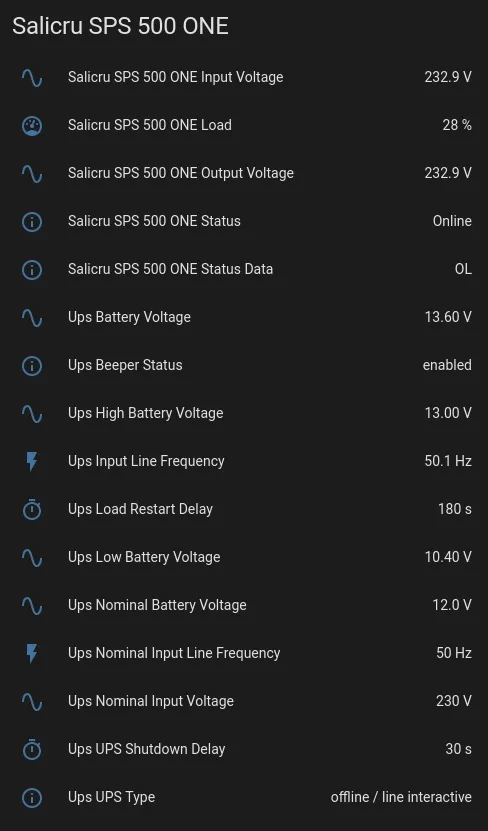
And once added, we can set up a dashboard with all the information.
I hope this has been helpful!

Comments